Clockout
Download the Clockout app

Download Clockout for Mac, iPhone, Android, and web.

One workspace across every surface. Start in the browser in seconds, add the Mac app when you want the timer one key away, and keep the timer, session notes, and invoice trail in your pocket on iPhone and Android.

Free plan, no cardBuilt for freelancersSyncs across every device
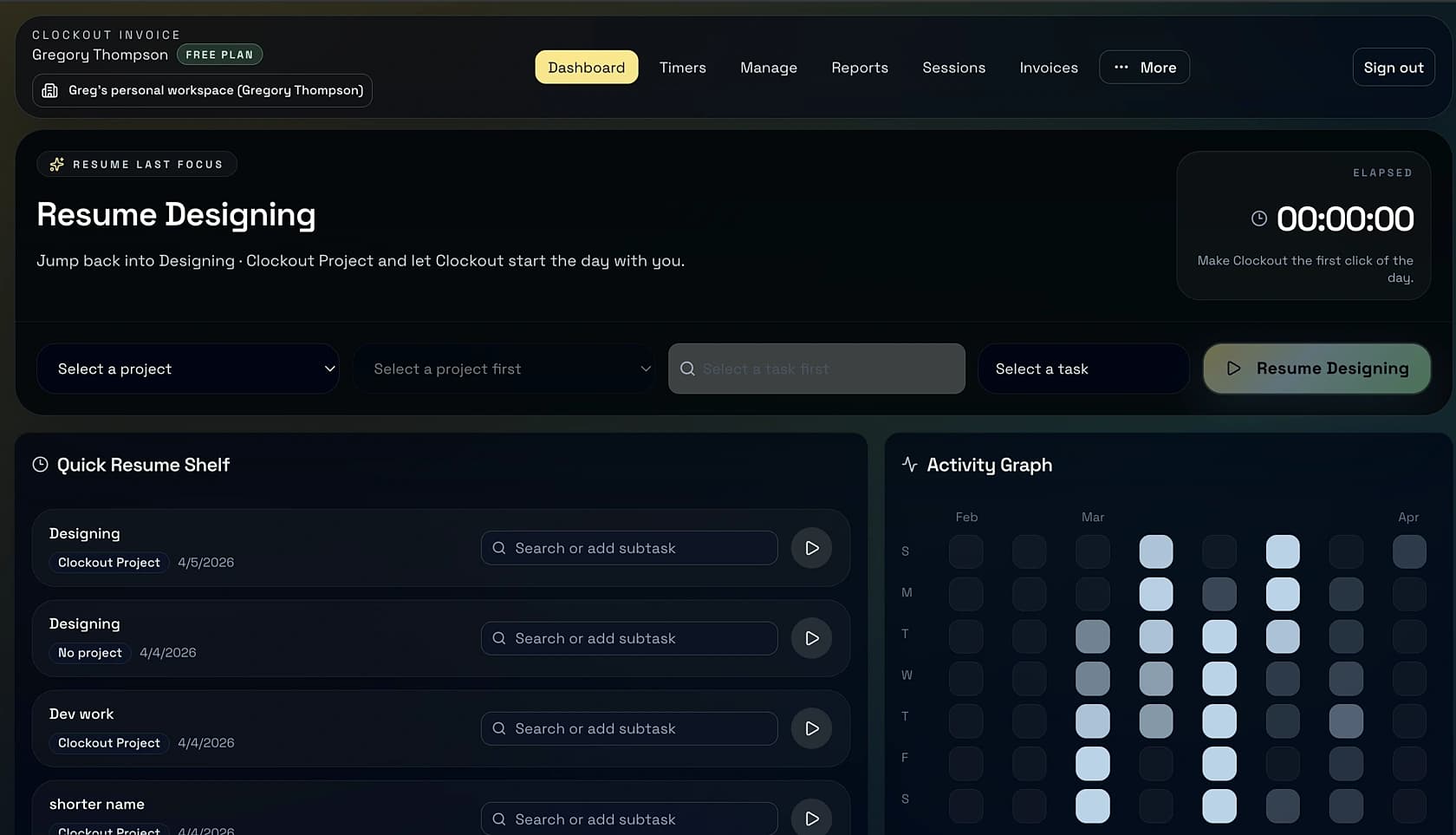
Clockout workspace showing the timer running with session notes and invoice context.

Why four apps

The timer you don't start is the session that never gets billed.

A freelancer’s billable hour is rarely at the desk it starts at.

You’re on your Mac when the client calls. You pick up the phone and walk into the kitchen. Forty minutes later you’re back at your desk, and the call is over, and nothing got logged. Or you’re on a train to a client meeting and a senior developer on your team DMs a question that needs a real answer — that’s the billable half-hour that gets lost because your laptop was in your bag.

Clockout exists on four surfaces for exactly this reason. The one you’re holding should be the one that captures the work. Start the call timer from your iPhone; finish it on the Mac. Let the Android widget sit next to your camera for client visits. Run the web app on the laptop your client loaned you. The billing trail doesn’t care which device you used — the workspace does the merging for you.

Pick the surface that removes the most friction from starting the timer in the first place.
The sync rule

Pick your platform

Install the surfaces that match your day.

Every Clockout app shares the same workspace. Start with whichever makes sense right now — the others can wait until you want them.

Web app

Open in the browser — no install, full power.

The fastest way to try Clockout is to skip installation entirely. Everything — time tracking, session notes, invoicing, reminders, reports — runs in any modern browser. Chrome, Safari, Firefox, Edge, Arc. This is where most people start, and many never leave. If you’re on Windows or Linux, this is your primary home.

Open the web app

Mac app

Native Mac app · 0.1.26

Add the Mac app the moment you want the timer closer to your keyboard. It lives in the menu bar, responds to global shortcuts, and handles brief network dropouts gracefully. Universal binary for Apple Silicon and Intel. If you work most of the day in a Mac environment, this is the surface that removes the last bit of friction from the tracking habit.

Download for Mac · 0.1.26

iPhone app

Install on iPhone — for client sessions away from the desk.

The iPhone app is for consultants who bill on the move: phone calls, coffees, site visits, commutes where the work is real and the desk is an hour away. Start the timer, add a quick note, and have the session already tagged when you open the Mac later. It is the difference between remembering the billable call and not.

Install on iPhone

Android app

Install on Android — the same workspace in your pocket.

The Clockout Android app syncs live with your web workspace and the Mac app. Quick tiles, a home-screen widget, and the same session notes that end up on your invoice. If your phone is Android, this is where the pocket timer lives.

Install on Android

One workspace, four surfaces

Track here, annotate there, invoice wherever you land.

The fact that Clockout is on four platforms would be noise if the data lived in four places. It doesn't. The workspace is the truth, and every app is a window onto it.

Timers are truthful across every device. Start one on your phone walking into a meeting; the Mac app shows it running the second you open the lid. Stop it from whichever side is closer. No duplicate rows, no manual merging, no arbitration over “which tool had it right.”

Session notes travel with the time. The note you jot on the iPhone at 11:02 a.m. is the note that lands on the invoice line next Friday. It doesn’t matter which app wrote the note — the session it belongs to carries it forward. When it’s time to bill, you are not reconstructing the week from memory.

Invoicing is a web moment. You can send invoices from any browser, but the ritual of Friday-afternoon review — adjusting rates, tagging write-offs, rolling the week into a draft — is designed for a bigger screen. The mobile apps make sure Friday never starts empty.

Install questions, answered

Everything to know before you download the Clockout app.

Is the Clockout app free to download?

Yes. Clockout is free to download on the web, Mac, iPhone, and Android. Every workspace starts on the free plan, which covers time tracking, session notes, and sending invoices. Paid plans unlock extras like recurring invoices and payment reminders — you never have to pay just to install the app.

Does Clockout have a Mac desktop app?

Yes. The Clockout Mac app keeps the timer one keystroke away so you can start, stop, and annotate sessions without tabbing back to the browser. Download it from this page — Apple Silicon and Intel Macs are supported.

Is Clockout available on Android?

Yes. The Clockout Android app is on the Google Play Store. It mirrors your web workspace so running timers, session notes, and invoice drafts stay in sync the moment your laptop reopens.

Is Clockout available on iPhone?

Yes. The Clockout iOS app is on the App Store. It's designed for freelancers and consultants who bill on the move — you can start the timer from your phone, jot a session note, and have it ready to invoice when you get back to your desk.

Do I have to download an app to use Clockout?

No. Clockout runs in any modern browser and you can do everything — track time, review sessions, generate and send invoices — without installing anything. Most people start in the browser, then add the Mac app later for quicker access.

Does my data sync across devices?

Yes. One Clockout workspace covers every surface. Timers you start on your phone show up on the Mac app and the web. Sessions you annotate on the web are ready to invoice from mobile. There's no separate account per platform.

Is Clockout a Windows or Linux app?

Today the desktop app ships for macOS. Windows and Linux users can use the full-featured web app — it runs in Chrome, Edge, Firefox, Safari, and Arc with no install step and supports the same time tracking and invoicing flows.

Keep exploring

Pages people open right after /download.

Compare pricing, see the full feature list, or read how Clockout differs from tools like Harvest before you commit to moving your billing over.

Start free

Track billable work today. Install the apps when you're ready.

Create your workspace in the browser now. The Mac, iPhone, and Android apps are one click away the moment you want them.